Is K3S too slow? (The Misery Cloud - 4)
Am I being unreasonable?
It is only logical that introducing an orchestration layer, a CNI, a proxy, a router and a DNS will inevitably add some overhead to our networking. After all the fastest way of doing something is not doing it.
But how much is too much?
In order to make this a pure networking problem I removed all the load of the application by disabling all DSPs. When the no DSPs are registered with the exchange the exchange will return early with a 404 on a bid request. Since there's basically no application logic here; we are only decoding a valid payload of 3KB and responding with a 404 so we are sure to be benchmarking purely the overhead introduced by the K3S networking stack. During every benchmark both the bare metal and K3S services are deployed so the idle cost of the K3S agent should remain steady for both scenarios. As well every benchmark calls the ingress directly to the node running the exchange to level the playing field and make sure there's no double hopping in the K3S stack.
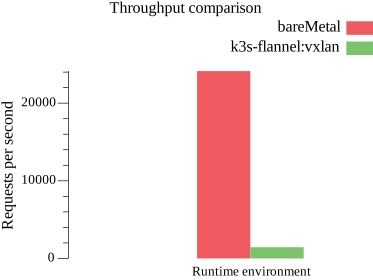
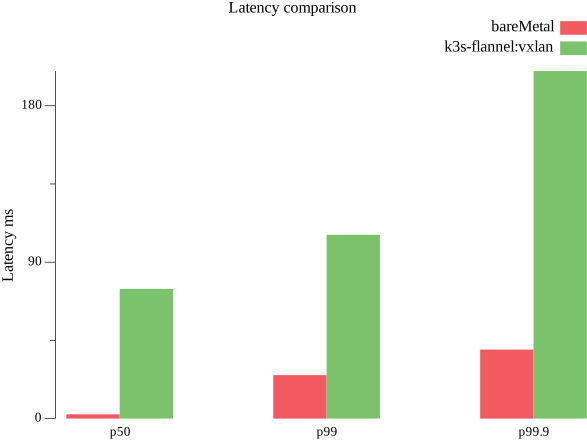
Can I live with this?
Now, I don't know about you but, 17x worse throughput and 6 times worse tail latencies don't scream good progression to me; specially for a system that lives and dies by it's p99. What can we do to bridge this gap?
The service deployed inside K3S is simply a container workload. K3S uses containerd as it's container runtime. In order to get an idea of how much overhead the container runtime is introducing we need to bypass the entire Kubernetes stack. For this we have enable host networking on the Kubernetes deployment.
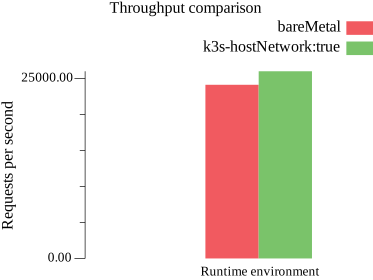
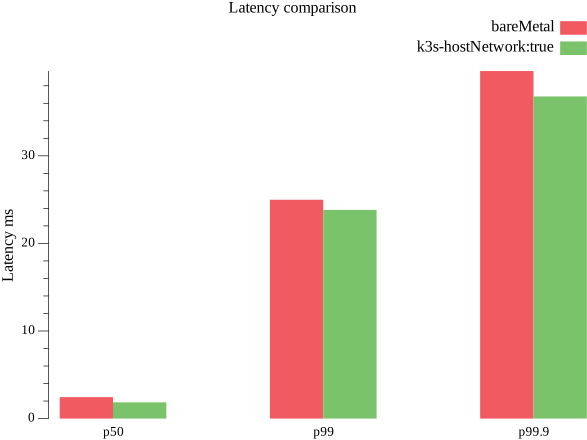
Well, the data is pretty is clear. There's virtually no overhead introduced by the container runtime. It even managed to pull a little ahead on throughput with a little worse latency but both measurements are well within the noise range.
So is this our solution?
Yeah keep dreaming. Unfortunately, there's a reason we don't use host networking by default. When enabling host networking any ports used by your container will be allocated on your host. This means you cannot have two services listening on the same port running on the same node. This greatly limits the flexibility of your topology since you have to account for port conflicts when scheduling pods.
The whole idea of Kubernetes is abstracting these gritty networking details so that you don't have to think of all this when deploying.
Given the nature of our application(an RTB exchange), it is actually not entirely crazy to use host networking. You will want to be running a single service per node in the cluster anyway. However it is not a practice easily portable to other domains and that would kind of defeat the pedagogical nature of this series.
So far we know somewhere between our NIC and our container lays a software stack that is killing our performance.
Blame the L3
So far we have discarded the container runtime as source of overhead in our application. Therefore we move one step up in the OSI model and take a quick look at our CNI plugin.
What is a CNI plugin?
In the context of Kubernetes CNI stands for Container Network Interface. Its job is to facilitate networking between pods.
Since Kubernetes is all about plugin components you can actually plug a plethora of CNI plugins to it.
The CNI plugins are called by the container runtime to setup the network environment. 1.
A CNI plugin must implement the Kubernetes network model:
- Each pod in the cluster gets its own unique IP.
- All pods can talk to each other (unless you intentionally segment the network)
- The Service API lets you provide stable(long lived) addresses to a service and proxy requests to a service to pods.
- The Gateway API (or the old Ingress) bridges the cluster services with external clients.
- NetworkPolicy controls traffic between pods or between pods and the outside world.
A CNI plugin will manage at least pod networking; it usually also manages NetworkPolicy and it can manage proxying. 2.
K3S ships with flannel. Flannel advertises itself as
a simple and easy way to configure a layer 3 network fabric designed for Kubernetes.
And that it is. The K3S install script setups flannel by default using VXLAN3 4. It is pretty easy to get a cluster going like this and if your traffic requirements are not incredibly high you're probably doing yourself a favor sticking to it. It's very stable and tracing it only requires having a decent grasp of iptables syntax[^netfilter] 5.
But as we've seen this simplicity is not free. Scanning iptables gets slow fast and tweaking conntrack6 across a cluster is a major headache.
Cilium
Anywhere I look, Cilium seems to be the answer.It's basically a one-stop shop for all your networking needs. Not only this, but it also setups the foundation for a pretty powerful observability stack with Hubble7.
All of this is thanks to this quirky technology called extended Berkeley Packet Filter(eBPF). Very poorly named if you ask me. If you do check their documentary you will find out that the naming comes from trying to frame this technology as not that big of an a change when introducing it in the Linux kernel. So they kind of borrowed the BPF name which doesn't hold all that much resemblance anymore.
eBPF is not only a better packet filter it's basically a game changer for kernel programming. This technology allows running sandboxed programs at the kernel level without having to recompile or load kernel modules.
So while before getting software to bypass the kernel was a huge headache now all you need is a small piece of C code that compiles just in time and runs in a sandbox in the kernel and a high level application can hook to this and capture network packets as close to the NIC as possible. Did I say network packets? Sorry "extended" you can basically capture every syscall in the OS.
So thanks to eBPF, if you use Cilium as your CNI and proxy layer, it bypasses the entire netfilter pipeline and conntrack.
The default Cilium configuration does still use VXLAN encapsulation. So we still get all the nice abstracted mesh network. So how much performance can we claim back by using Cilium?
Setting up Cilium
Setting up Cilium is kind of a headache. In order to reap its benefits you need to first disable flannel, kube-proxy, NetworkPolicy, ServiceLB and Traefik. At this point I was wondering - why did I use K3S again? I've basically replaced most of its components. Anyway the single binary is still nice to have.
Setting up Cilium was a lot of back and forth. Corrupted network configurations, broken MTUs and whatnot. Since we are still rolling with VXLAN we are still losing 50 bytes on the header of each package to encapsulation. Not a big deal when using jumbo frames but I won't be breaking my home network for that right now; therefore we will have a drop for sure since we are eating 50 out of our 1500 bytes in the frames. 8.
How fast is this Cilium then?
Drum roll:
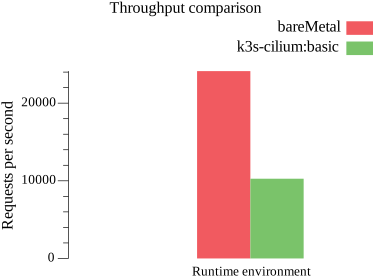
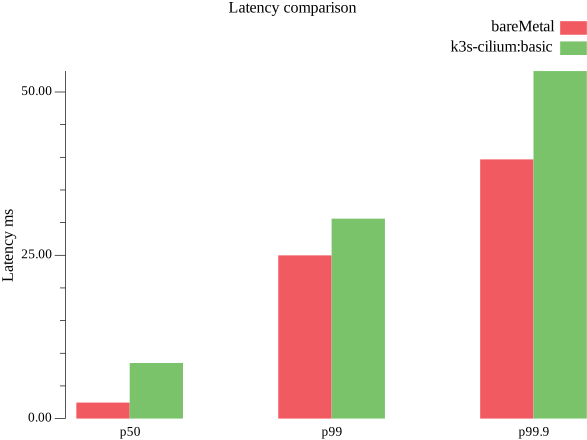
That was ... something. Well, we did not remove all of the overhead - figures!. Apparently network encapsulation is still kind of a problem. Anyway we are getting a clear signal: iptables and conntrack were indeed a huge portion of the overhead in our system. As a matter of fact this was measured directly against the egress which did require an extra hop to connect so the results might actually be a little unfair to Cilium in this case. For the time being I will settle with having half the throughput instead of 17x.
The tail latencies are looking pretty good on both and as my tests continued they stayed mostly flat which is a core issue here.
Everything is a lie
So far I've only been benmarking the speed at which my laptop can reach my test node over my lan and get a response back. This is not really fair though. Our RTB has to talk to dozens of downstream systems without breaking a sweat - at least it should.
Since we've decided to take Cilium for ride let's see how it performs once I hookup 3 DSPs to my service.
How are the DSPs deployed you ask? Well, remember how in the first chapter of the series I automated the deployment of virtual machines? Oh, you forgot? Go read that first and get back to me then.
For the rest of you who were paying attention, this is were you start putting that overpowered PC of yours to work.
You bump the worker count to 3. Run your Ansible playbook to setup K3S again. This time Cilium configured. I did find a couple of effective effective tutorials for getting my deployment working9 10.
At this point you should have a cluster running with cilium deployed. I am not going yet to publish the repo of this project so this ansible playbook should give you a rough idea of what you need to do to get things rolling.
# k3s-setup.yaml
- name: Uninstall K3s from Control nodes
  hosts: control:worker
  tasks:
        - name: uninstall_k3s
      ansible.builtin.script: ../play_scripts/remove-k3s.sh
      when: k3s_uninstall_required | bool | default(false)
      become: true
      register: uninstall_k3s_result
          - name: Signal service restart
      set_fact:
        k3s_restart_required: true
      when: uninstall_k3s_result.changed
  - name: Write system wide config
  hosts: control:worker
  tasks:
        - ansible.builtin.command: mkdir -p /etc/rancher/k3s
      become: true
        - name: Write docker registry config
      become: true
      ansible.builtin.template:
        dest: /etc/rancher/k3s/registries.yaml
        src: ../tmpl/rancher/k3s/registries.yaml
      register: config_result
          - name: Signal service restart
      set_fact:
        k3s_restart_required: true
      when: config_result.changed
  - name: Bootstrap cluster
  hosts: control[0]
  tasks:
        - ansible.builtin.include_tasks: ../tasks/control-node-tasks.yaml
      vars:
        extra_service_options: "--cluster-init"
          - ansible.builtin.include_tasks: ../tasks/setup-cilium.yaml
      when: k3s_use_cilium | bool | default(false)
  - name: Join extra control nodes
  hosts: control[1:]
  tasks:
        - ansible.builtin.include_tasks: ../tasks/control_tasks.yaml
      vars:
        extra_service_options: ""
  - name: Join worker nodes
  hosts: worker
  tasks:
        - name: Install k3s service
      become: true
      when: k3s_restart_required | bool | default(false)
      environment:
        INSTALL_K3S_EXEC: agent
        K3S_URL: "{{ k3s_url }}"
        K3S_TOKEN: "{{ k3s_agent_token }}"
        INSTALL_K3S_VERSION: "" #This should be a fixed version for real production scenarios
      ansible.builtin.shell: curl -sfL https://get.k3s.io |  sh -s -
          - name: restart_k3s_agent
      become: true
      ansible.builtin.command: systemctl restart k3s-agent.service
      when: k3s_restart_required | bool | default(false)
# setup-cilium.yaml
- name: Install cillium
environment:
API_SERVER_IP: "{{ k3s_api_server_ip }}"
API_SERVER_PORT: "{{ k3s_api_server_port }}"
ansible.builtin.script: ../play_scripts/install-cilium.sh
ignore_errors: true
when:
- k3s_restart_required | bool | default(false)
- become: true
ansible.builtin.command: mkdir -p /var/lib/deployment/kubernetes/cilium
- name: wait_for_cilium_status
environment:
KUBECONFIG: /etc/rancher/k3s/k3s.yaml
ansible.builtin.command: cilium status --wait --wait-duration 2m0s
- name: write_cilium_ip_pool
become: true
ansible.builtin.template:
dest: /var/lib/deployment/kubernetes/cilium/lb-ipam.yaml
src: ../tmpl/kubernetes/cilium/lb-ipam.yaml
register: write_cilium_ip_pool_result
- name: setup_ip_pool
ansible.builtin.command: kubectl apply -f /var/lib/deployment/kubernetes/cilium/lb-ipam.yaml
- name: write_cilium_config
become: true
ansible.builtin.template:
dest: /var/lib/deployment/kubernetes/cilium/values.yaml
src: ../tmpl/kubernetes/cilium/values.yaml
register: write_cilium_config_result
- name: update_cilium_config
environment:
KUBECONFIG: /etc/rancher/k3s/k3s.yaml
ansible.builtin.command: cilium upgrade -f /var/lib/deployment/kubernetes/cilium/values.yamlDeploying the app
Since I'm going to be running a single exchange service and a whole bunch of DSPs I don't want to be describing nearly identical deployments over and over changing only the name of the service running.
So I resorted to using Helm much sooner than I had hoped. Helm is basically a package manager for Kubernetes. Obviously there are a lot things you deploy in Kubernetes beyond your app that are plain boring and have been done over and over. Observablity, databases, streaming. For most tools you can configure there's probably a helm outhere that has already package a "sane" set of defaults. Do exercise caution though. Ask yourself first - Is this helm really saving me that much time that I'm willing to take on another dependency?
Anyway, Helm does have a templating engine(basically is just Go's templating engine) and it allows you to manage a deployment from a paramtric source. Look at that, just exactly what I need.
# charts/dsp-fleet/templates/deployment.yaml
{{- range .Values.dsps }}
apiVersion: apps/v1
kind: Deployment
metadata:
  name: {{ .name }}
  labels:
    app: {{ .name }}
    service: dsp
    project: rtb
spec:
  replicas: 1
  selector:
    matchLabels:
      app: {{ .name }}
  template:
    metadata:
      labels:
        service: dsp
        app: {{ .name }}
    spec:
      topologySpreadConstraints:
                - maxSkew: 1
          topologyKey: kubernetes.io/hostname
          whenUnsatisfiable: ScheduleAnyway
          labelSelector:
            matchLabels:
              project: rtb
      containers:
                - name: {{ .name }}
          image: {{ $.Values.image }}
          env:
          {{- toYaml $.Values.shared_env | nindent 12 }}
          {{- toYaml .env | nindent 12 }}
          ports:
                        - containerPort: {{ $.Values.port }}
---
apiVersion: v1
kind: Service
metadata:
  name: {{ .name }}
spec:
  selector:
    app: {{ .name }}
  ports:
        - port: {{ $.Values.port }}
      targetPort: {{ $.Values.port }}
---
{{- end }}
# values.yaml
image: get-your-own-private-registry/rtb-dsp:latest
port: 5000
dsps:
- name: braid
env:
- name: RTB_DSP_NAME
value: braid
- name: RTB_DSP_BASE_URL
value: http://braid:5000
- name: the-witness
env:
- name: RTB_DSP_NAME
value: the-witness
- name: RTB_DSP_BASE_URL
value: http://the-witness:5000
- name: order-of-the-sinking-star
env:
- name: RTB_DSP_NAME
value: order-of-the-sinking-star
- name: RTB_DSP_BASE_URL
value: http://order-of-the-sinking-star:5000
shared_env:
- name: RTB_DSP_ONBOARD_ENDPOINTS
value: http://rtb-exchange:3000/dspDo pay attention in the deployment at topologySpreadConstraints.
By setting maxSkew: 1 we are nudging the scheduler to try to spread
the pods across the nodes in the cluster.
On top of that I set the nodeSelector to constraint the exchange pod to only run in nodes labeled role=exchange.
This way I can make sure my exchange always run in my dedicated node instead of running in my virtual machines.
Since these is the essential part of the system it makes sense to allocate dedicated hardware for it.
apiVersion: apps/v1
kind: Deployment
metadata:
  name: exchange
  labels:
    project: rtb
    service: exchange
    app: exchange
spec:
  replicas: 1
  selector:
    matchLabels:
      app: exchange

  template:
    metadata:
      labels:
        app: exchange
        service: exchange
        project: rtb

    spec:
      topologySpreadConstraints:
                - maxSkew: 1
          topologyKey: kubernetes.io/hostname
          whenUnsatisfiable: DoNotSchedule
          labelSelector:
            matchLabels:
              project: rtb
      nodeSelector:
        role: exchange
      containers:
                - name: rtb-exchange
          image: get-your-own-private-registry/rtb-exchange:latest
          imagePullPolicy: Always
          env:
                      - name: RTB_EXCHANGE_PORT
             value: "3000"
          ports:
                        - name: http
              containerPort: 3000
                        - name: tracing
              containerPort: 6060
---
apiVersion: v1
kind: Service
metadata:
  name: rtb-exchange
spec:
  selector:
    app: exchange
  ports:
        - name: web
      protocol: TCP
      port: 3000
      targetPort: 3000
        - name: tracing
      protocol: TCP
      port: 6060
      targetPort: 6060
---
apiVersion: networking.k8s.io/v1
kind: Ingress
metadata:
  name: rtb-ingress
spec:
  rules:
        - host: exchange.rtb.internal
      http:
        paths:
                    - path: /
            pathType: Prefix
            backend:
              service:
                name: rtb-exchange
                port:
                  number: 3000
                    - path: /debug
            pathType: Prefix
            backend:
              service:
                name: rtb-exchange
                port:
                  number: 6060
So the deployment should be looking like this.
$ kubectl get pods -o custom-columns="POD:.metadata.name,NODE:.spec.nodeName"

POD                                          NODE
braid-769f8d7b64-k5wck                       worker-1
exchange-5f85474bc4-rfrkb                    mini-1
order-of-the-sinking-star-67f5955cd6-sl26f   worker-2
the-witness-7b84995df4-zln6k                 worker-3
So this is the app deployed in Kubernetes. For deploying the app on the metal of the same nodes I just built them and scp them to the nodes.
Just a few bash commands and you get the cluster deployed - which kind of makes you think of how much complexity we are introducing here just for the sake of it.
#!/usr/bin/env bash

ssh "$1" '/home/ubuntu/rtb-dsp -dsp-name "$(cat /etc/hostname)" -base-url "http://$(ip -br addr show eth0 | awk  '\
  \''{print $3}'\'' | cut -d/ -f1):5000" -port 5000 -onboard-endpoints http://192.168.1.206:3000/dsp'
By the way: I did switch the VM image from Debian to Ubuntu cause I just couldn't get Acpi working with that one so I couldn'tu more than one core. Having Ubuntu does bother me in other ways though so once the next wave of procrastination hits I'll probably be replacing it with Arch or NixOS.
With both deployments running the exact same setup I proceeded to benchmark again.
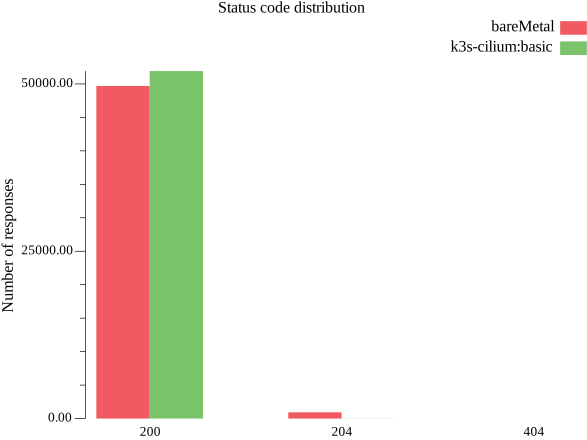
Say what again?
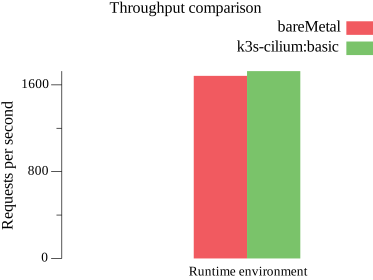
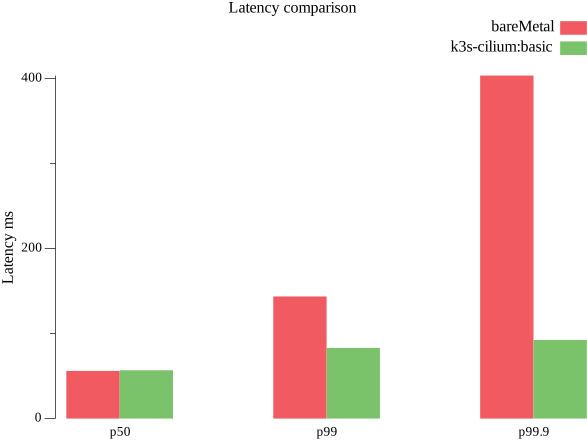
The simple fact of making our application work for real brought with it some awful side-effects. Now the performance of both environments has tanked going from 24,000 reqs/s in the metal and 10,000 reqs/s in K3S to roughly 1600 reqs/s on both(now there's real load so, duh) with K3S actually coming out a little on top. The status code distribution shows the metal also had more no-bids in general. This means that all 3 DSPs failed to answer in time.
Even more alarming is the abysmal tail latencies that are appearing now on the metal side compared to Cilium's. Now I do not have any L3 layer to blame by my poor performing code and my badly tuned kernel. Given that the application is hardcoded to cap the request that take too long at 80ms this tail latencies point to shortcomings in my basic networking configuration. Of course it doesn't help I decided to play in hard mode by putting the containers inside VMs.
Conclusion
If you were expecting closure in today's post, I am very sorry to disappoint. This benchmarks on these low settings of a the application have revealed a new bottleneck. At this point there's no more flannel to blame, only poor coding on my part and a badly tweaked kernel. Next step is profiling my exchange code and the network stack in the VM host and guests.
In the gap between 24,000 and 1,600 lies a bucn of my poor decisions coming back to bite me: killing our throughput and spiking our tail latencies.
Will he solve it? Will he not? Stay tuned for more news on "The Misery Cloud"